Every shot, tracked from the foul line to the pins.
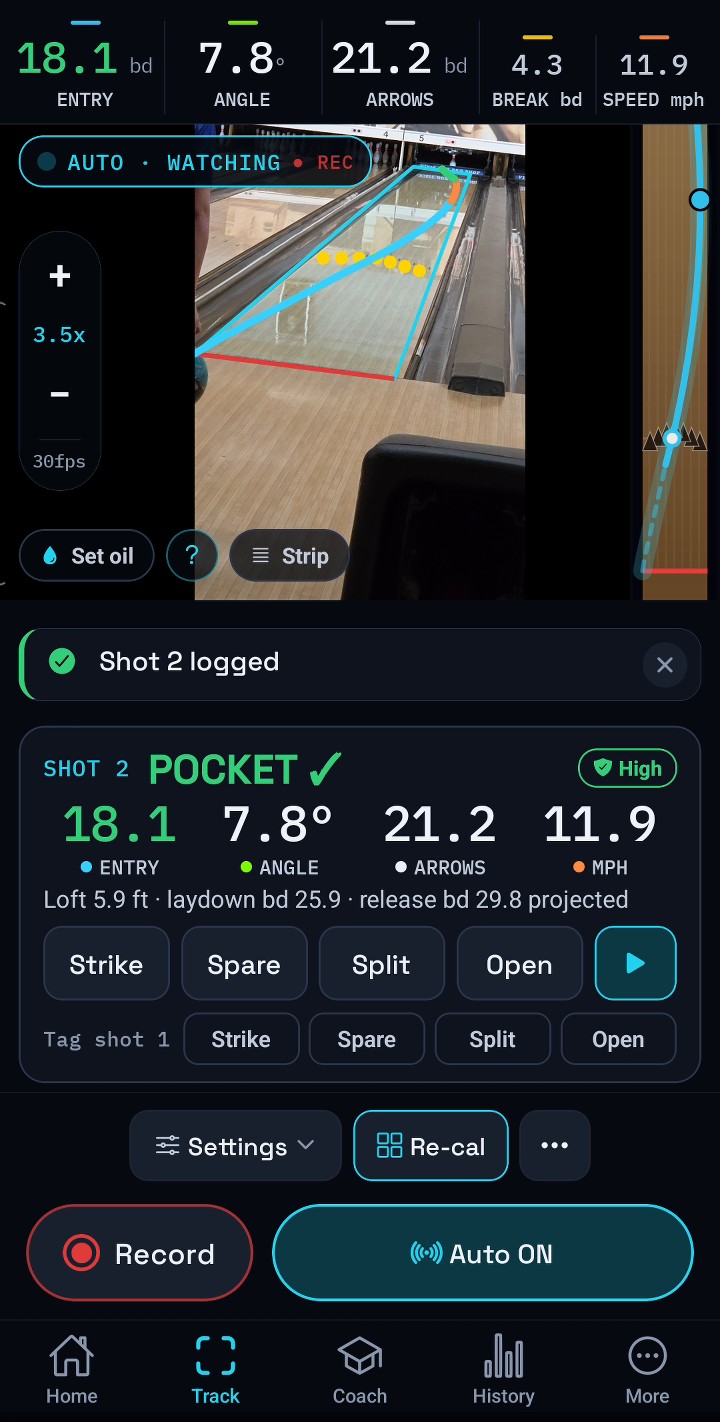
Put your phone on a stand beside the approach and bowl. LaneLens finds the ball frame by frame, maps it onto the 39 boards and draws the shot back on the lane: entry board and angle, breakpoint, speed, then the next move to make. The tracking runs on the phone, not on a server.
- No sensors, no extra hardware
- No account needed
- Clips stay on your phone
Every throw comes back drawn on the lane.
Moments after the ball hits the deck, the shot draws itself onto a lit-up lane: the path grows down the boards in its phase colours, the pins scatter by how well it should have carried, and the numbers that matter are pinned right where they happened.
Skid, hook and roll, in colour
The ball's tracked path, split into its phases. A roll phase the camera didn't see clearly is drawn dashed and marked as an estimate.
Laydown, arrows, breakpoint, entry
Each one pinned to the lane where it happened, with how far it was off your target or your average.
Speed, entry angle and the pocket call
Pocket hit, light, high or a miss, by how many boards, with the tracking confidence beside it.
Lane or stats, one tap
Flip the reveal to a nine-number grid: foul line, arrows, breakpoint, entry, launch and entry angle, launch and impact speed, and rev rate.
Every shot of the session, one swipe away
Flick between throws to compare, replay any of them, or share the card.


The ball's real path, in boards and feet.
A trained detection model finds the ball in each frame of your clip, right on the phone. It marks the point where the ball touches the lane, not just its outline, and one lane calibration maps that point onto the 39 boards and the 60 feet to the head pin.
Foul line board
The board you released over, projected back to the foul line from the roll.
Arrows board
Where the ball crossed 15 ft. Your target, checked.
Breakpoint board & distance
The board and the distance down the lane where the ball turned for the pocket.
Entry board
Where the ball arrived at the head pin, and the pocket call that follows from it.
Launch & entry angle
The angle off your hand and the angle it came into the pocket.
Launch & impact speed
One fit of the whole roll gives the speed off the hand, at the pins, and the loss between.
Rev rate & axis
Measured from the ball's own rotation in the video. No sensor in the ball, no second camera.
All of it, per shot
Flip any shot from the lane to its stat grid: nine numbers, estimates marked with ≈.
Read where the ball touches the lane
The ball model finds the contact point on the lane surface, so the shiny reflection of the ball in the oil doesn't pull the board number off. When the phone gets bumped between throws, LaneLens re-aligns the lane box to the first throw instead of quietly shifting every number. Gutter balls are recognised and kept out of your averages.
Loft, laydown and release board
How far the ball carried past the foul line, the board it landed on, and the release board projected back to the line.
Rev rate and axis, measured from the video
On a ball with a visible pattern, LaneLens follows the pattern turning to measure rev rate, axis rotation and axis tilt. No sensor in the ball and no second camera. A solid-colour ball simply shows no rev rate rather than a guess.
Pocket verdict and a carry estimate
From the entry board and angle, LaneLens calls the hit (pocket, light, high or missed) and gives a carry estimate. It is labelled as an estimate, because the camera reads the ball, not the pins. Tag the real result with one tap.
Shot Replay
Your clip with the trace drawn on it and an overhead lane beside it. Zoom in on the bowler, let auto slow-mo slow down the break, play a shot side by side with your best, keep the clips you want, and share a clip with the overlay on it.
Measured
A plain number means the camera tracked the ball through that part of the lane.
Estimated
The value was extended past where the ball was last seen. Estimates never move your averages.
At least
A bound: the ball was lost before the end, so the real value is at least this.
Not measured
LaneLens could not see it, so it doesn't make a number up.
Turn on Auto, then just bowl.
No tapping record between shots. Auto watches the lane, starts when it sees your throw and stops after the ball reaches the pin deck. Then it analyses the recorded clip for the accurate read.
- Watching
Waits for the throw
The camera stays on while you walk back, pick up your ball and set up.
- Tracking
Follows the ball down the lane
It starts when the ball enters the lane and follows it all the way down to the pins.
- Quick read
A first look about a second after impact
A quick read shows up about a second after the ball reaches the pins.
- Logged
The refined result
The recorded clip is analysed again for the final numbers, and the shot is saved to History with its replay.
Numbers are the easy part. Knowing what to change is harder.
The Coach reads your recent shots and gives you one adjustment at a time, in plain language, with the shots that back it up. It only uses your own shots.
It tells you when the lane is moving
When your entries keep coming in high or light while your line stays put, a card appears on the Track screen: move 2-and-1 left, feet two, eyes one. It shows the evidence too, like 3 of 5 shots high and the breakpoint drifting 2.8 boards.
A repeatability score
A 0–100 score for how tightly you repeat your arrows, breakpoint, entry and speed, with the one spread that is costing you the most.
A ghost of your best shot
Mark a shot as your reference and it rides along as a copper ghost line on every reveal and over the replay video, with the difference at the arrows, the break and the entry.
Spare mode
Pick the leave, get a target line at the arrows, throw, and the shot is graded against that line. Spare balls stay out of your pocket stats.
Stats for each ball
LaneLens can recognise which of your balls you threw and keeps averages for each one. Optionally connect your locker from The Ballroom to bring in your real arsenal.

One page that tells you how the session really went.
Every session gets a report built from your measured shots only. Gutter balls, spares, short tracks and estimates are left out, and it says how many shots it counted.
Your typical line, with a corridor
The median path of the session drawn on the lane, with a band for the middle 80% of your shots, and each number given as a range, not just an average.
A consistency ladder
Each metric gets a level, from Developing through League, Competitive and Tournament to Elite, plus exactly how much tighter it has to get for the next one.
Speed–rev balance
Whether your revs and speed are matched or lean one way, and what that means for the lanes and balls you pick. Shown only when there are enough confident rev rates.
Was it the lane, or was it you?
A plain read on whether misses came from the line wandering or from the lane changing under a repeatable line, so you know whether to work on execution or move.
Share it as an image or a PDF
A clean one-page card for your coach, your team chat or your own records.


Set up once, then read every shot.
Place the phone
On a steady stand, to the side of the approach, zoomed in about 2.5× so the foul line and the pins are both in frame. A quick Pre-flight check tells you whether the setup is good to go.
Calibrate the lane
Mark the foul line and the base of the pins. LaneLens snaps the far edge to the pin bases, and an arrow check confirms that the boards line up.
Bowl
Turn on Auto, or use Record / Stop. Each throw comes back as a shot reveal with a replay and a coaching note, is saved to your History, and rolls up into the session report.
- To the side of the approach, out of the bowler's way and not on the lane.
- Steady. Use a stand or clamp. If the phone gets bumped between throws, LaneLens corrects for it and tells you when to re-check the lane box.
- About 2.5× zoom, with the foul line and pins both in frame.
- Android only for now.
Join the beta.
LaneLens is in beta on Android. Test builds come through Google Play testing or Firebase App Distribution. Ask for an invite and we'll send you a link.
Request a beta inviteNo account needed. Read the privacy policy and the terms, including the beta rules.